Secure Every Connection with Gluetun
The lightweight Gluetun that runs in a container. WireGuard & OpenVPN, a built-in kill switch, encrypted DNS, and 40+ providers — one small image that protects your whole stack.
What Is Gluetun?
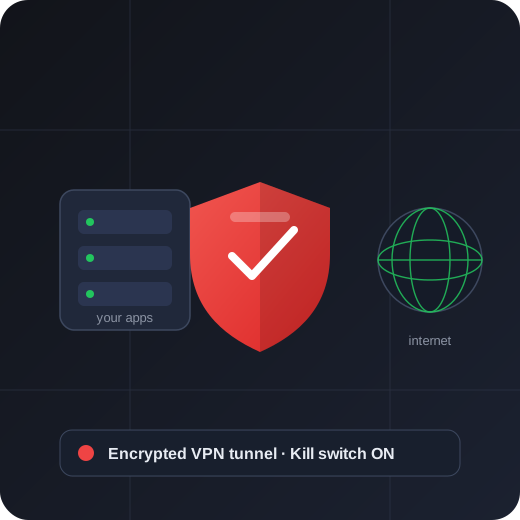
Gluetun is a free, open-source VPN client packaged as a lightweight container. Instead of a separate desktop app for every service, you run one small image that connects to the VPN provider of your choice using WireGuard or OpenVPN.
Who It's For
Gluetun is built for self-hosters, homelab enthusiasts, and privacy-minded users who want VPN-only networking they can trust. Route any container or device through it and everything stays protected behind a firewall kill switch.
Why It Was Created
The project set out to make provider-agnostic, leak-proof VPN routing simple to deploy anywhere. By handling the tunnel, DNS, and firewall in one place, Gluetun became a cornerstone of countless secure home servers around the world.
Read MoreWhy Users Choose Gluetun
From its firewall kill switch to its built-in proxies, here's what makes Gluetun the go-to VPN client for containers.
Kill Switch
A firewall ensures traffic can only leave through the VPN. If the tunnel drops, nothing leaks — everything simply waits.
WireGuard & OpenVPN
Pick your protocol with a single variable — fast, modern WireGuard or broadly compatible OpenVPN.
40+ Providers
Mullvad, ProtonVPN, NordVPN, PIA, Surfshark and many more — plus custom OpenVPN and WireGuard configs.
DNS Over TLS
Encrypted DNS out of the box, with optional block lists for ads, trackers, and malware — no plaintext leaks.
Port Forwarding
On supported providers, Gluetun requests and exposes a forwarded port automatically for inbound connections.
Free & Open Source
No license fees and nothing hidden. Inspect the code, pin any version, and self-host with full confidence.
Lightweight Container
A tiny, multi-arch image that runs smoothly on servers, NAS boxes, and even a Raspberry Pi.
Built-In Proxies
An HTTP proxy and Shadowsocks let LAN apps send traffic through the VPN without joining the container.
Health & Control API
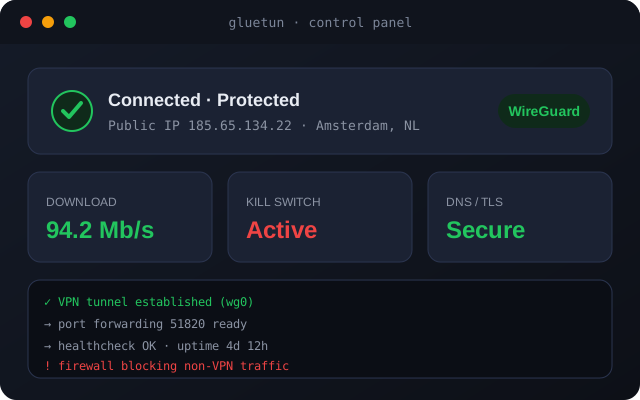
Automatic reconnects on a failed health check, plus a control API to read status and your live public IP.
Download & Deploy
Pull the free, open-source image and have a protected tunnel running in minutes. Self-host it on your own server or deploy it to the cloud.
Installation Guide
Get a protected tunnel running in under two minutes with these four simple steps.
Pull
Pull the Gluetun image from a trusted container registry.
Configure
Set your provider, protocol, and credentials via environment variables.
Run
Start the container with the NET_ADMIN capability enabled.
Connect
Wait for the health check, then route your traffic through the tunnel.
How Gluetun Works
A quick look at the routing model that keeps everything protected.
Choose Provider
Set your VPN service and protocol — Gluetun builds the encrypted tunnel.
Route Traffic
Point apps or containers at Gluetun so their traffic leaves only through the VPN.
Stay Protected
The kill switch blocks leaks and auto-reconnects if the tunnel ever drops.
Platform Compatibility
Gluetun is a small multi-arch image that runs almost anywhere containers do.
| Platform | WireGuard | OpenVPN | Notes |
|---|---|---|---|
| Linux (Docker) | Supported | Supported | Best-supported option |
| Windows (Docker Desktop) | Supported | Supported | Runs via WSL2 |
| macOS (Docker Desktop) | Supported | Supported | Intel & Apple Silicon |
| Raspberry Pi / ARM | Supported | Supported | Native multi-arch |
| NAS (Synology, QNAP) | Supported | Supported | Via container manager |
| Kubernetes | Workable | Supported | As a sidecar |
Pros & Cons
A balanced view to help you decide if Gluetun fits your setup.
The Good
- Free, open source, no license fees
- Leak-proof firewall kill switch
- Works with 40+ providers
- Tiny, multi-arch, low resource use
- Built-in DNS, proxies, and control API
The Trade-offs
- Requires a separate VPN provider account
- Assumes basic container knowledge
- No graphical desktop installer
- Port forwarding is provider-dependent
- Config is variable-driven, not point-and-click
Perfect Use Cases
Different setups, one client that keeps them all protected.
Home Servers
Route your entire self-hosted stack through one protected tunnel with a single container.
Privacy
Keep your IP hidden and DNS encrypted, with a kill switch that stops leaks cold.
Developers
Test region-specific behavior and route dev containers through a controllable VPN.
Seedboxes & P2P
Bind download clients to the VPN so nothing ever touches your real connection.
Remote Work
Give remote machines consistent, region-locked access without per-device VPN apps.
Homelab Tinkerers
Experiment with providers, protocols, and proxies from one reproducible config.
Common Troubleshooting
Hit a snag? These quick fixes solve the most frequent issues.
Container stays unhealthy
Ensure the NET_ADMIN capability is added and your provider credentials are correct — the logs state the exact cause.
No internet in routed apps
Wait for the health check to pass, and confirm the child uses network_mode "service:gluetun".
DNS resolution fails
Your network may block DNS-over-TLS. Switch the DoT provider or disable it temporarily to isolate the issue.
What Users Say
Real feedback from the self-hosting community.
Frequently Asked Questions
Everything you need to know about downloading and running Gluetun.
Download & Setup
Yes. Gluetun is completely free and open source under the MIT license. You still need an account with a supported VPN provider.
Pull the official image from a trusted container registry, or grab the source and releases from the project's repository. Avoid unofficial mirrors.
Very small — only a few tens of megabytes — so it pulls quickly even on modest connections and low-power devices.
Pull the image, set your provider variables, and run it with NET_ADMIN. Our Docker Compose guide has a ready-to-use file.
Yes. Gluetun is a client — it connects to a VPN provider you already have. It does not run its own VPN servers.
Yes. Gluetun ships multi-arch images, so it runs natively on ARM devices like the Raspberry Pi.
Yes. It runs on Synology, QNAP, Unraid, and similar NAS platforms through their container managers. See our compatibility guide.
A container runtime such as Docker or Podman, the NET_ADMIN capability, and credentials for a supported VPN provider.
It's designed to run as a container, but any OCI-compatible runtime works, including Podman and orchestrators like Kubernetes.
Check that NET_ADMIN is added and credentials are correct. Our troubleshooting guide covers more.
Features & Security
Yes. It's open source and enforces a firewall kill switch. See our security guide for best practices.
It's a firewall that only allows traffic through the VPN. If the tunnel drops, nothing routed through Gluetun can leak.
WireGuard is faster and simpler; OpenVPN is more widely supported. Our comparison helps you choose.
Over 40, including Mullvad, ProtonVPN, NordVPN, PIA, and Surfshark, plus custom configs. See the providers guide.
Yes. Use network_mode "service:gluetun" so a container shares the tunnel and is covered by the kill switch.
On supported providers, yes. Gluetun requests and exposes the port automatically. See our port forwarding guide.
It offers encrypted DNS-over-TLS with optional block lists for ads, trackers, and malware across everything routed through it.
Yes. A small control server API lets you read status and your public IP, and trigger reconnections for automation.
The health check detects it and reconnects automatically, while the kill switch keeps traffic blocked until it's back.
It's a community-driven open-source project, developed in the open with contributions from users around the world.